Since summer 2026 Google asks for a passkey before anyone changes who can access a Google Ads account, and before a tool gets access to Google Ads on someone’s behalf. For agencies this matters on day one of every new client: if the client has never used a passkey with their Google account, getting access can stall for days.
What changed
- In Google Ads itself: adding users, changing their access and linking accounts to a manager account are “sensitive actions” that need a passkey. Google made passkeys mandatory for these actions in July and August 2026.
- For tools that connect to Google Ads: since 5 August 2026 the Google Ads API only issues new access to people who sign in with a passkey. Password plus a code from the phone is no longer enough for this step. Access a tool got before that date keeps working.
- Analytics, Tag Manager and Search Console are not affected. Sharing those works with a normal sign-in.
Why it can take up to 7 days
A passkey that was just created is not trusted straight away. Google says a new passkey usually pairs with Google Ads within one to two days, and that a security delay of up to 7 days can apply. During that time the sign-in may loop: Google asks to approve the new passkey with an existing one, or sends you back to create one.
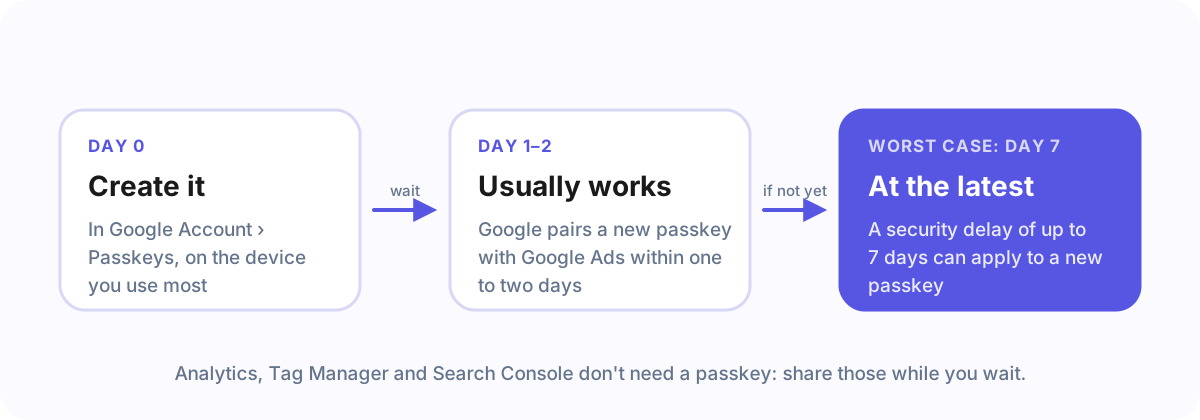
If it loops, it is not broken. Keep the passkey, wait, and try again on the same device and browser where you created it. A device on which the Google account already used a passkey before is usually trusted sooner.
What to tell your client, before you send the link
- Check for a passkey now: Google Account › Passkeys. If one is listed and was used before, you are ready.
- If there is none, create one today on the phone or computer you use most. Then wait a day or two before sharing Google Ads access.
- Everything else, like Meta, Analytics and Tag Manager, can be shared in the meantime.
Google Workspace accounts: the admin setting
If your client (or you) signs in with a company Google Workspace account, the Workspace admin may first have to allow passkeys. The message “Your admin has not enabled passkeys for sign-in” points to this. In the Google Admin console:
Security › Authentication › Passwordless › Skip passwords: tick “Allow users to skip their password and authenticate with a passkey” for the organisational unit, and save. Changes take effect within minutes, but the waiting period for a new passkey still applies.
Frequently asked questions
Do I need a passkey to give an agency access to Google Analytics?
No. Analytics, Tag Manager and Search Console are shared with a normal sign-in. Only Google Ads access and linking need a passkey.
Why does Google say my passkey will work in up to 7 days?
A new passkey is not trusted straight away. Google usually pairs it with Google Ads within one to two days; a security delay of up to 7 days can apply.
What does “Your admin has not enabled passkeys for sign-in” mean?
Your Google Workspace admin has to allow passkeys: Admin console › Security › Authentication › Passwordless › Skip passwords, then save.
How Agency Client Onboarding handles it
When a request asks for Google Ads, the client sees this passkey note before signing in with Google, and can share everything else first and come back to the same link later. On the agency side, connecting Google for your address and Search Console needs no passkey; only the optional Google Ads step does.
Sources
Read on 29 September 2026: Google Ads API: security requirements, Google Ads Developer Blog: passkey authentication requirement, Google Ads Help: use a passkey to complete sensitive actions.