Agencies and freelancers work in a client’s Shopify store as collaborators: they get their own login through their Shopify Partner account, do not count as a staff seat, and the store owner decides which sections they may use. To send a request, the agency needs the store’s collaborator request code.
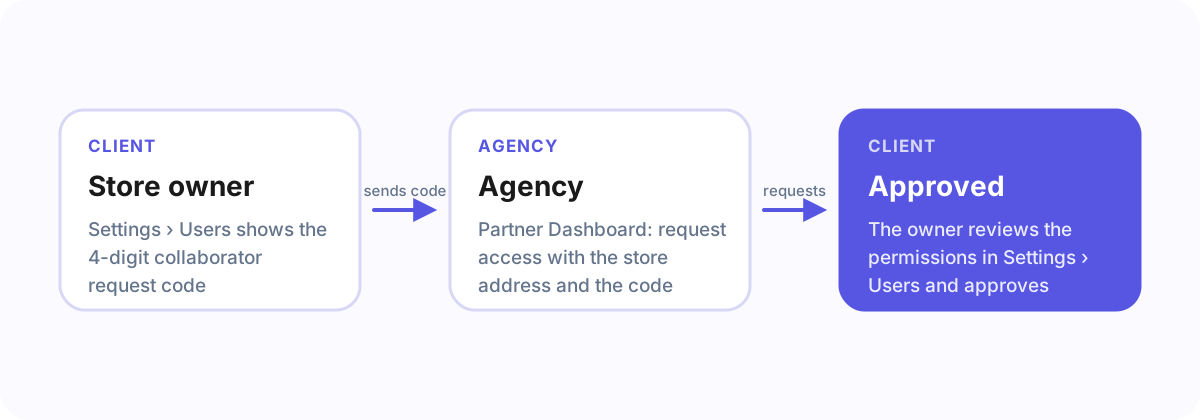
Where the store owner finds the code
- In the Shopify admin, open Settings › Users.
- In the section about collaborators, the store shows its collaborator request code (four digits), and whether a code is needed at all.
- Send the code to the agency.
How the agency sends the request
In the Shopify Partner Dashboard the agency adds a store and chooses request access to a store, enters the store’s address and the collaborator request code, and selects the permissions it needs.
How the store owner approves it
The request appears in the Shopify admin under Settings › Users. The owner reviews the requested permissions, can remove any of them, and approves. Access can be removed there at any time.
Which permissions
Ask only for the sections the work needs, for example products and orders for a shop redesign, or online store and themes for a theme change. Collaborators never get the store owner’s own rights, like transferring the store.
Frequently asked questions
Do collaborators count as staff accounts?
No. Collaborator accounts do not use one of the store’s staff seats.
Can I change what a collaborator can do later?
Yes, the store owner can change or remove a collaborator’s permissions under Settings › Users.
The quicker way
In an Agency Client Onboarding link, Shopify is a guided step: the client enters the collaborator request code once, it is shown only to the agency, and deleted a week after the step is done.